

portugask
Administrator
- Cihazı Bağlayın ve Hazırlayın:
- Programınızda Xiaomi bölümünü seçerek cihazınızı tanımlayın.
- Cihazınızın ayarlarından USB Hata Ayıklama (USB Debugging) özelliğini aktif hale getirin.
- Read critical data Okuyun:
- Programın arayüzünde "General" bölümüne gidin ve buradan "Meta" sekmesini seçin.
- Ardından "Read critical data" seçeneğine tıklayarak başlatmadan bekleyin.
- Meta Moduna Geçin:
- Programın sol alt köşesinde bulunan "reboot adb to meta" (adb'yi meta modunda yeniden başlat) seçeneğine tıklayın.
- Bu sırada "force meta" (meta moduna zorla) kutucuğunun işaretli olduğundan emin olun. Sonra işlemi başlatın.
- MTK Portu Bağlantısını Kurun:
- Cihaz yeniden başlarken ses kısma ve ses açma tuşlarına aynı anda basılı tutun.
- Ekranda MTK portu göründüğünde tuşları bırakın ve bağlantının tam olarak kurulması için VCOM portunun gelmesini bekleyin.
- Kritik Veriyi Düzenleyin:
- Kaydettiğiniz kritik veri dosyasını Udes.tr gibi bir düzenleme aracıyla açın.
- Bu dosya içinde, gerekli IMEI numarası bilgilerini girerek düzenlemeyi tamamlayın.
- Kritik Veriyi Cihaza Yazın:
- Programda "Write critical" seçeneğini seçin.
- Düzenlediğiniz dosyayı bilgisayarınızdan seçin.
- İşlem sırasında sadece "reboot device" (cihazı yeniden başlat) seçeneğinin işaretli olduğundan emin olun.
- İşlemler başarılı olmazsa cihazı sıfırlayıp tekrar deneyebilirsiniz.
- Connect and Prepare the Device:
- In your software, select the Xiaomi section to detect the device.
- Enable USB Debugging from the device settings.
- Read Critical Data:
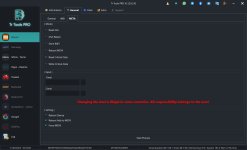
- In the program interface, go to the "General" section and select the "Meta" tab.
- Click on "Read critical data" and wait before starting the process.
- Switch to Meta Mode:
- Click the "reboot adb to meta" option (restart ADB into meta mode) located in the lower-left area of the program.
- Make sure the "force meta" checkbox is enabled, then start the process.
- Establish MTK Port Connection:
- As the device restarts, hold both Volume Up and Volume Down buttons simultaneously.
- When the MTK port appears on the screen, release the buttons and wait for the VCOM port to fully connect.
- Edit the Critical Data:
- Open the saved critical data file with a tool such as Udes.tr.
- Enter the required IMEI information into the file and complete the editing.
- Write Critical Data Back to the Device:
- Select the "Write critical" option in the program.
- Choose your edited file from your computer.
- Ensure that only the "reboot device" option is selected during the process.
- If the operations are not successful, you may reset the device and try again.
Moderatör tarafında düzenlendi:
