
Xiaomi 14T (Degas) ANA KONU

Durum
Üzgünüz bu konu cevaplar için kapatılmıştır...

portugask

Administrator
    1. Cihazı Bağlayın ve Hazırlayın:
      • Programınızda Xiaomi bölümünü seçerek cihazınızı tanımlayın.
      • Cihazınızın ayarlarından USB Hata Ayıklama (USB Debugging) özelliğini aktif hale getirin.
    2. Read critical data Okuyun:
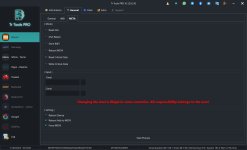
      • Programın arayüzünde "General" bölümüne gidin ve buradan "Meta" sekmesini seçin.
      • Ardından "Read critical data" seçeneğine tıklayarak başlatmadan bekleyin.
    3. Meta Moduna Geçin:
      • Programın sol alt köşesinde bulunan "reboot adb to meta" (adb'yi meta modunda yeniden başlat) seçeneğine tıklayın.
      • Bu sırada "force meta" (meta moduna zorla) kutucuğunun işaretli olduğundan emin olun. sonrada işlemi başlatın.
    4. MTK Portu Bağlantısını Kurun:
      • Cihaz yeniden başlarken ses kısma ve ses açma tuşlarına aynı anda basılı tutun.
      • Ekranda MTK portu göründüğünde tuşları bırakın ve bağlantının tam olarak kurulması için VCOM portunun gelmesini bekleyin.
    5. Kritik Veriyi Düzenleyin:
      • Kaydettiğiniz kritik veri dosyasını Udes.tr gibi bir düzenleme aracıyla açın.
      • Bu dosya içinde, gerekli IMEI numarası bilgilerini girerek düzenlemeyi tamamlayın.
    6. Kritik Veriyi Cihaza Yazın:
      • Programda "Write critical" seçeneğini seçin.
      • Düzenlediğiniz dosyayı bilgisayarınızdan seçin.
      • İşlem sırasında sadece "reboot device" (cihazı yeniden başlat) seçeneğinin işaretli olduğundan emin olun.
      • İşlemler başarılı olmazsa cihazı sıfırlayıp tekrar deneyebilirsiniz.


        1.Connect and Prepare the Device:
        • Select the Xiaomi section in your program to detect your device.
        • Enable USB Debugging in your device settings.
        • Read Critical Data:
          • Go to the "General" section in the program interface and select the "Meta" tab.
          • Then click on the "Read critical data" option and wait before starting.
        • Enter Meta Mode:
          • Click the "reboot adb to meta" (reboot adb into meta mode) option located at the bottom-left of the program.
          • Make sure the "force meta" checkbox is enabled, then start the process.
        • Establish MTK Port Connection:
          • While the device is restarting, press and hold both the volume down and volume up buttons.
          • When the MTK port appears on the screen, release the buttons and wait for the VCOM port to appear to ensure full connection.
        • Edit the Critical Data:
          • Open the saved critical data file using an editing tool such as Udes.tr.
          • Enter the required IMEI information inside this file and complete the editing.
        • Write the Critical Data to the Device:
          • Select the "Write critical" option in the program.
          • Choose the edited file from your computer.
          • Ensure that only the "reboot device" option is checked during the process.
        • If the process is unsuccessful, you can reset the device and try again.

        • yükle.jpg
 
Moderatör tarafında düzenlendi:

mklgltkn

Administrator

Xiaomi 14T (Degas) — 9. Ay 2025 ve Sonrası Güncelleme Alan Cihazlar İçin Onarım


Xiaomi 14T (Degas) — 9. Ay 2025 Güncellemesi Sonrası Onarım Yöntemi Değişmiştir


DEGAS — 9. Ay 2025 ve Sonrası Güncelleme Almış Cihazlar İçin İşlem Sıralaması

1. METHOD


1- Bootloader kilidini açın. Fastboot’tan ENG ROM atın veya destekleyen bir AUTH tool ile ENG ROM yükleyin.
2- ADB method+PATCH BL LOCK seçili şekilde çift SIM yazın. Yeni yazdığınız IMEI’ler engde görünmez global dönünce gelicek merak etmeyin.
3- Fastboot’tan HyperOS 2 Global ROM seçin. OPCUST ve OPCONFIG tiklerinin hepsini kaldırarak cihaza yazın.

2. METHOD


1- Bootloader kilidini açın.
2- Magisk ile manuel olarak cihazı rootlayın.
3- ADB method+PATCH BL LOCK IMEI repair işlemini yapın.
4- Root’u kaldırın veya temiz ROM atacaksanız yine Fastboot’tan ROM seçip OPCUST + OPCONFIG tiklerini kaldırarak yükleyin.

(9. Ay güncellemesi almamış cihazlar için: Forumumuzda bulunan ROTHKO başlığına gidin. Oradaki Patch BL Lock anlatımı birebir aynı şekilde bu cihaz için de geçerlidir.)

Not: İletişim cihazlarının IMEI numaralarını değiştirmek yasal değildir. Lütfen cihazın orijinal IMEI numaralarını kullanınız.

Uzaktan Bağlantı ile Destek İçin:​


WhatsApp: Wa.me/905536590144
Telefon: 0553 659 0144

Xiaomi 14T (Degas) — Repair Method for Devices Updated After September 2025


Xiaomi 14T (Degas) — Repair Method Changes After September 2025 Update


DEGAS — Repair Steps for Devices Updated After September 2025

1st METHOD


1- Unlock the bootloader. Flash the ENG ROM via Fastboot or use any supported AUTH tool.
2- Select ADB method+PATCH BL LOCK and write dual SIM. The new IMEIs you entered won't be visible in the ENG database; they'll appear when the global version returns, don't worry.
3- In Fastboot, select HyperOS 2 Global ROM. Uncheck all OPCUST and OPCONFIG options and flash the ROM.

2nd METHOD


1- Unlock the bootloader.
2- Manually root the device using Magisk.
3- Perform IMEI repair in ADB method+PATCH BL LOCK.
4- Remove root, or if flashing clean ROM, select Fastboot ROM and uncheck OPCUST + OPCONFIG before flashing.

(If the device has NOT received the September update: Go to the ROTHKO topic on our forum. The Patch BL Lock instructions there are exactly the same for this device.)

Note: Changing the IMEI number of communication devices is illegal. Always use the device’s original IMEI numbers.

For Remote Support:​


WhatsApp: Wa.me/905536590144
Phone: +90 553 659 0144
 
Son düzenleme:
Durum
Üzgünüz bu konu cevaplar için kapatılmıştır...
Üst